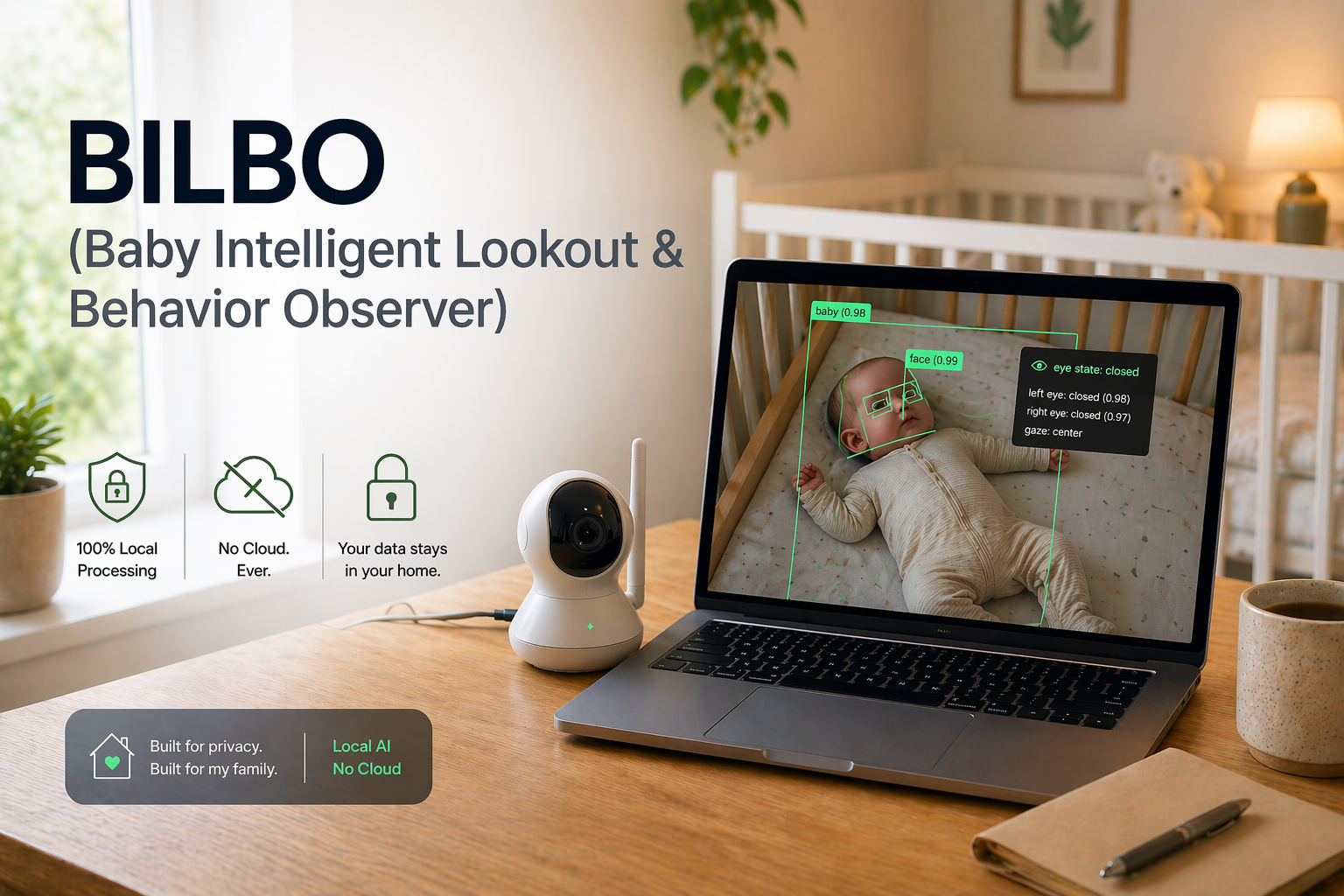
Part 1 of 2. This post is the build — architecture, model cascade, training pipeline, and dashboard. Part 2 is the meta: six opinions the project left me holding more strongly, six failures that taught me more than the successes, and the new failure modes coding agents introduce that nobody is naming yet.
Even before my child was born, I started looking into baby monitors in the market, and got a bit nervous with my options.
The expensive ones — Nanit, Owlet, Cubo Ai — were essentially "give us your bassinet feed and we'll send you alerts on our app." Cloud-based. Vendor accounts. Subscription tiers. Servers in places I couldn't see, hosting frames of my newborn for retention windows nobody could quite explain. Half the reviews mentioned the company being acquired or pivoting.
The cheap ones were dumb cameras with proprietary apps that streamed unencrypted and got bricked when the manufacturer stopped pushing firmware. One product line I almost bought had been the subject of a CVE the previous summer.
So I built my own. The design constraint I started from was that the bassinet camera should never leave my home network — a hard architectural rule, not a configurable preference. The system is a $25 IP camera clamped to the bassinet rail, an old Intel Mac that was about to become e-waste, a few hundred lines of Python, and a small MobileNetV3-Small classifier that decides whether the baby's eyes are open. Total cost: about $50. Total video frames sent to a third party during normal operation: zero. (I do run a Cloudflare tunnel for dashboard access from my phone, which I'll get into — but no baby imagery ever leaves the Mac.)
This post is the build: how BILBO is put together, what each piece does, and the tradeoffs with measured numbers. The opinions and lessons the project left me with are in part 2.
What I built
The system is called BILBO (Baby Intelligent Lookout & Behavior Observer, because every weekend project needs a strained backronym).
It does three things:
-
Captures a frame from the bassinet camera once a minute. A long-running
capturecontainer loops on a one-minute tick, running anffmpegcommand that pulls a single JPEG out of the camera's RTSP stream. No constant streaming, no buffer in someone else's data center. -
Classifies the frame with a 3-stage on-device ML pipeline. Is there a baby in the bassinet? Where is their face? Are their eyes open or closed? All three answers come from small CNNs running on the Mac's CPU.
-
Stores the result in a local SQLite database alongside the frame, the model's confidence scores, and a timestamp. Indexed for fast queries. JSONL backup for paranoia.
There's also a local Flask dashboard for me to scroll through the timeline, look at any frame, and correct labels the model got wrong. Corrections feed back into a retraining loop. The dashboard is served by its own lightweight container and published only inside my home network — the way I reach it from outside is a Cloudflare tunnel that originates on the Mac as an outbound connection. No inbound ports on my router are ever opened, and the camera frames themselves never leave the Mac at all. More on the tunnel security model in a minute.
The whole thing is ~13,000 lines of Python and ~6,500 lines of HTML, CSS, and JavaScript for the dashboard, packaged as a four-container Docker stack. It's open source now — the code is on GitHub under an MIT license, and the pretrained BIRDEYE weights are on Hugging Face. Anyone with a free afternoon and a machine that runs Docker could stand up a version of it.
System architecture
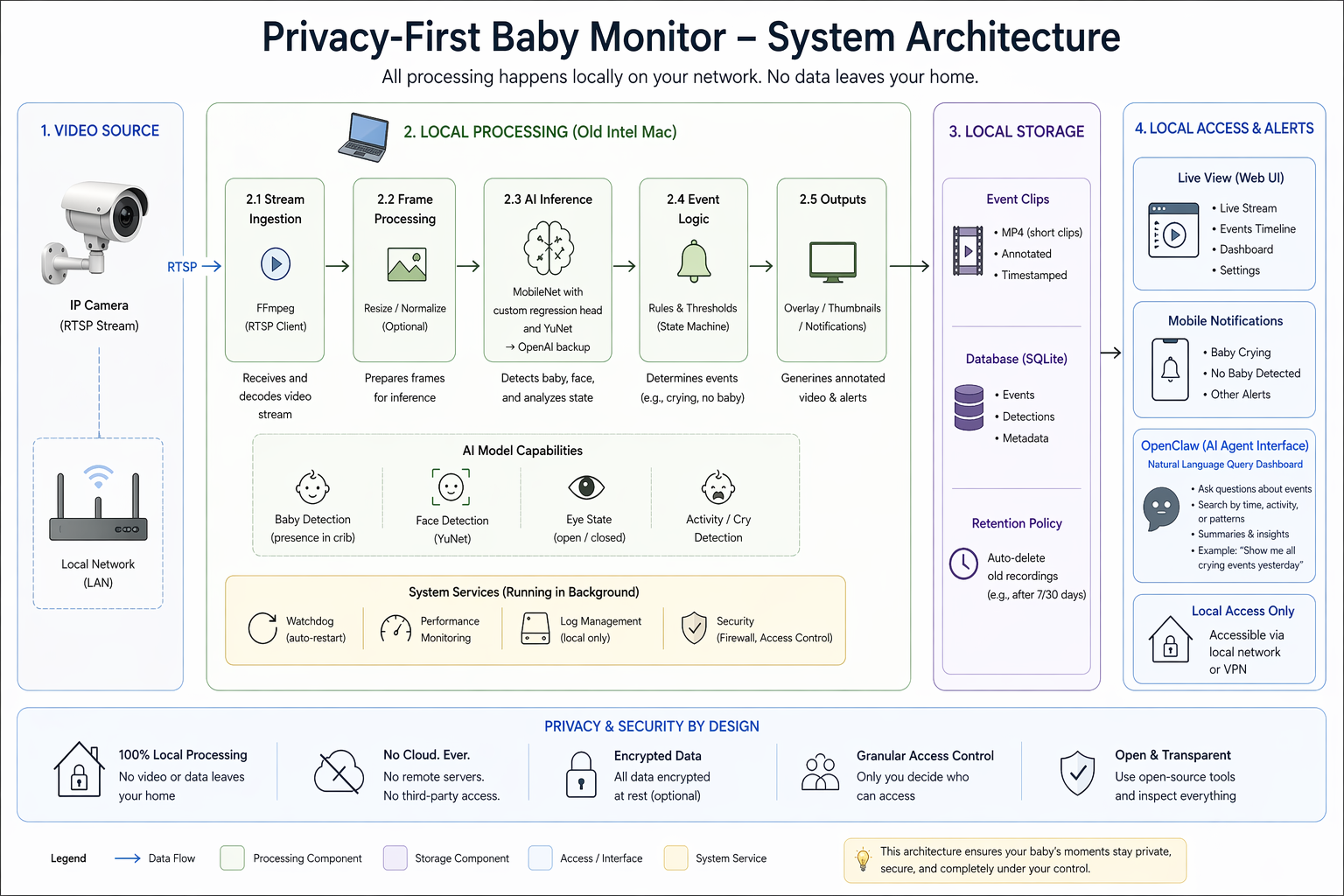
Four boxes, left to right: video source → local processing → local storage → local access & alerts. Every arrow in the diagram stays inside the "Your Home Network" boundary — no component in the steady-state path reaches out to the internet, and raw camera frames never cross that boundary under any circumstances. (The BIRDEYE → cloud-API fallback sits off the classifier and is reached on under 1% of frames when the on-device cascade can't decide; it isn't drawn as a primary edge because it isn't one.)
Concretely, the pieces:
- The camera — a $25 TP-Link Tapo C100. RTSP, 1080p, IR night vision. It lives on a private network segment with no internet access; the Mac talks to it directly over the LAN.
ffmpeg— the pixel-grabbing primitive. Oneffmpeg -rtsp_transport tcp -i <url> -frames:v 1 frame.jpgcall grabs a single frame and exits, in about 2 seconds.- The Python pipeline — Python 3.12, PyTorch + torchvision for the MobileNetV3-Small models,
opencv-python-headlessfor image I/O. It's a proper installable package now (src/bilbo/,pip install -e .);bilbo-monitor --loopis the capture entry point. It runs as a persistentcapturecontainer that ticks once a minute and hot-reloads the model weights when a retrain flips thelatestsymlink — so a new model goes live within a minute, no container restart. - SQLite + WAL — every frame's metadata: timestamp, classifier outputs, confidence scores, JPEG path. ~6 ms for a 24-hour timeline query, no ORM. WAL mode lets the dashboard read without blocking the writer.
- The dashboard — a single-page UI for reviewing the timeline and correcting mistakes. It's its own lightweight container that serves the static frontend and reverse-proxies API calls to a separate
control-apiservice (more on the split below). Remote access goes through a Cloudflare tunnel (next section), never an inbound port. - Docker Compose — three always-on containers:
capture(the per-minute pipeline plus a watchdog thread that pings Telegram if no frame has landed in a few minutes),control-api(the REST surface), anddashboard. A fourth,training, is spawned on demand —control-apilaunches it through the mounted Docker socket when I click Retrain, and it auto-removes when it's done. Retraining is manual-only; there's no scheduled retrain. - Telegram alerts — wake and safety pings sent straight to the Telegram Bot API over stdlib
urllib. Outbound HTTPS only; no camera imagery rides along — just text and, when warranted, a single cropped still.
Totals: ~12 dependencies, a ~1.5 GB image (PyTorch is the heavy hitter), ~13,000 lines of Python. You could swap any piece without restructuring — the stack runs on any machine with Docker (a Mac with Docker Desktop, a Linux box, in principle a beefy Pi), and the model is just whatever sits behind the latest symlink. The architecture is independent of the implementation choices, and there's nothing in the diagram you couldn't draw on a napkin.
Why four containers
The same cleanup that made the project open-source-able also split the original one-process monolith into four containers, each with a single job:
captureholds all the heavy machinery — PyTorch, OpenCV, ffmpeg — and is the only container that ever touches the camera or runs a model. It's on host networking so the RTSP stream resolves cleanly, runs the watchdog as a background thread, and exposes a tiny internalPOST /inferendpoint so the dashboard's "re-run this frame" button reuses the already-warm model instead of cold-starting one.control-apiis the REST surface (/api/v1/*, ~30 routes). It reads the shared SQLite DB directly and proxies inference calls tocapture— but it has no PyTorch in its image at all, which keeps it small.dashboardis deliberately dumb: it serves the static frontend and reverse-proxies/api/*tocontrol-api. It imports nothing from the rest of the project — nobilbocode, no torch — so the public-facing container is about as small an attack surface as a Flask app gets.trainingdoesn't run until I ask for it.control-apispawns it through the Docker socket, it trains on the shared volumes, flips thelatestsymlink, and removes itself.
The point of the split isn't microservices for their own sake — it's that the container exposed to my phone (the dashboard) shares no code with the container that can see the camera (capture). The privacy boundary in the diagram is now also a process boundary.
Reaching the dashboard from outside my LAN
One thing I wanted but couldn't get from a pure localhost-only design: check the dashboard from my phone when I'm at the grocery store or at work. The naive version of this is "forward a port on the router and hit my public IP." That's the single biggest footgun in a home-hosted setup, and the whole privacy argument falls apart the moment there's a listening socket on a public IP address.
The fix is a Cloudflare tunnel. A small daemon (cloudflared) runs on the Mac and opens a single persistent outbound TLS connection to Cloudflare's edge. When I hit the dashboard's subdomain from my phone, Cloudflare terminates TLS at their edge, authenticates me with Cloudflare Access (Google SSO + a one-time email code), and then proxies the request back through the already-open tunnel to the dashboard container running on the Mac. No inbound ports on my network are ever opened. My router's firewall stays completely closed to the world.
The security model has three layers:
- No direct exposure. There is no listening socket on my public IP. A port scan of my home network finds nothing. Anything reaching my Mac has to have come through the tunnel, which means it had to clear Cloudflare first.
- Encryption end-to-end. The phone-to-Cloudflare hop is TLS (standard HTTPS). The Cloudflare-to-Mac hop is the tunnel, also encrypted. At no point on the wire is the dashboard traffic in clear text.
- Cloudflare's edge protections in front of everything. Rate limiting, bot filtering, a WAF, and Cloudflare Access as the auth gate all sit between the public internet and my Flask app. And the only thing facing that tunnel is the dashboard container — a ~120-line reverse proxy with no model, no database driver, and none of the project's own code in it. The part of the system that can see the camera isn't asked to survive contact with the open internet; it isn't even in the same container.
BIRDEYE: three small nets watching the bassinet
The on-device classifier cascade is called BIRDEYE — Baby IR-aware Recognition & Detection of EYE-state. ("BILBO" is the whole monitor; "BIRDEYE" is the brain it runs on.) It's the part of the project that does the actual perception work — everything else is plumbing around it.
The naive version of "is the baby awake" is a single binary classifier on the full frame. That doesn't work — at the resolution of the bassinet crop, the baby's eyes are about 8 pixels tall. A small CNN has nothing to learn from.
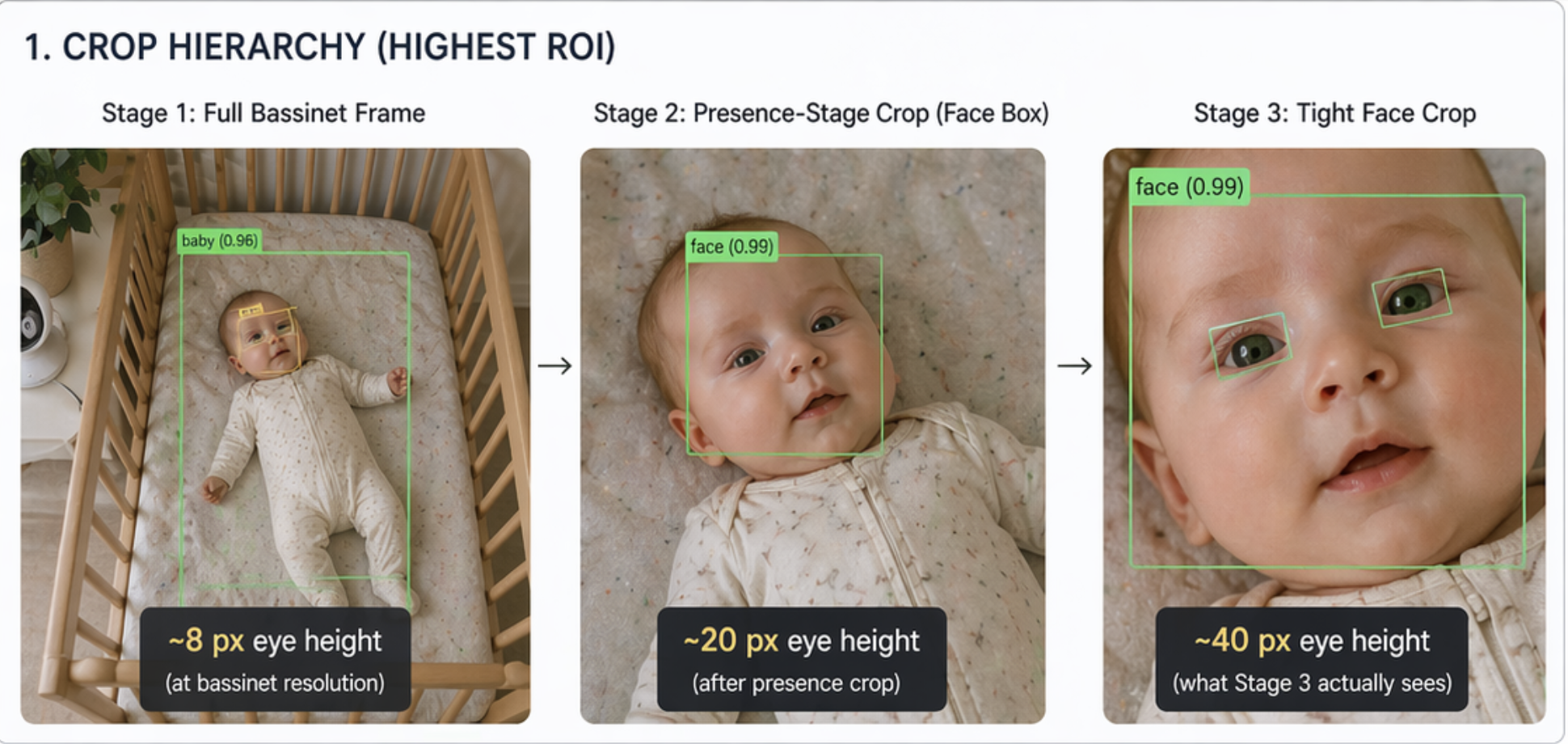
The whole motivation for the cascade is on that diagram. At the bassinet resolution there's nothing usable; by the time stage 3 gets the face crop, the same eyes are ~5× larger and a small CNN has plenty to work with. No stage has to solve a hard problem on a bad input — each just has to solve an easy problem on a good one.
Concretely, the three stages:
-
Is there a baby in the bassinet? A fixed crop of the bassinet center →
presentornot_present. The classifier doesn't need to see eyes, just a baby-shaped thing in the rectangle; it hits macro F1 0.99 against my reviewed-and-corrected ground truth. -
Where is the face? The same bassinet crop → a face bounding box, or "no face found." The only stage that needs spatial reasoning: a custom MobileNetV3-Small with a regression head outputting
(x1, y1, x2, y2, confidence). About 780 hand-corrected bbox annotations got it to a 100% detection rate on baby-present validation frames. -
Are the eyes open? A tight crop around the stage-2 face →
eyes_openoreyes_closed. The eyes are now ~40 pixels tall instead of 8 — plenty of signal for a small CNN. Macro F1 0.91.
All three are ImageNet-pretrained MobileNetV3-Small models, fine-tuned on data from my own bassinet. The whole cascade runs in ~130 ms on CPU — no GPU, no accelerator hardware.
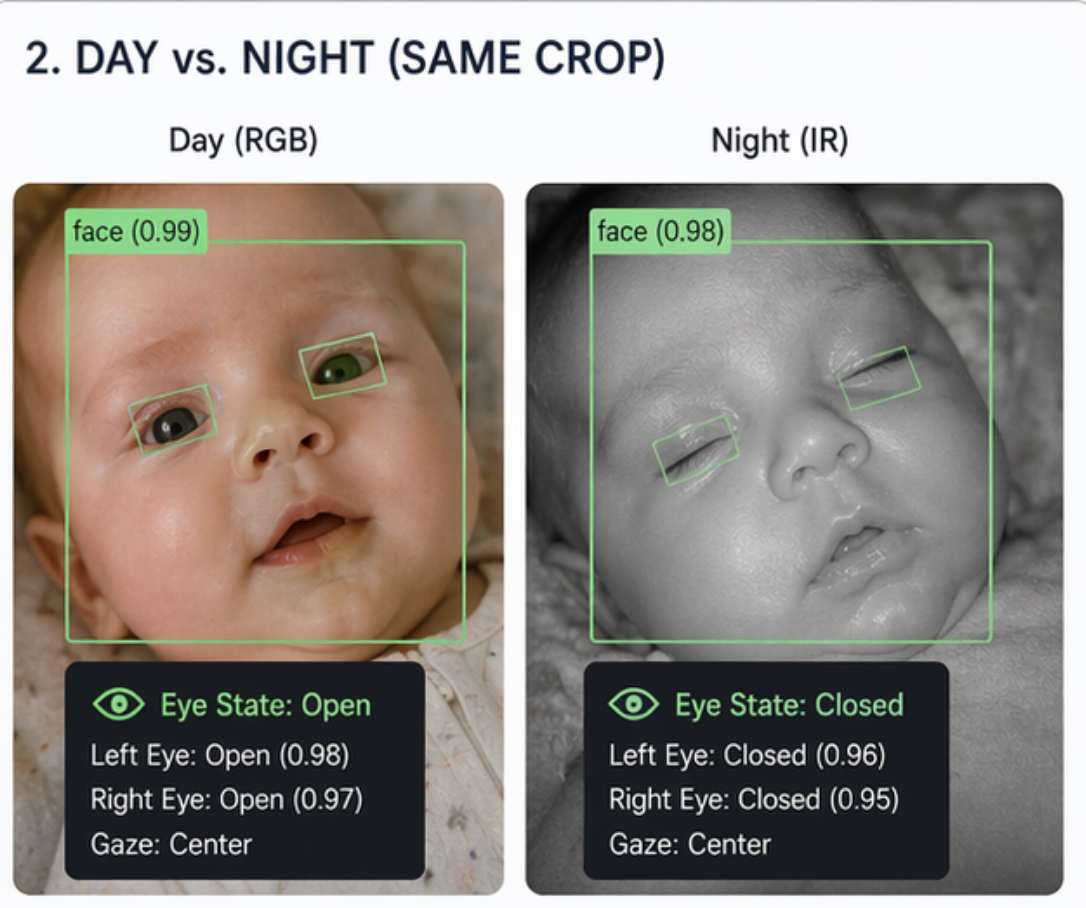
A question I kept getting: does this work at night? The IR panel on the right is the same cascade on the same baby, just a different pose and a different lighting modality. Confidence stays in the same range. The reason it works is that both frames came from the same bassinet, so the training set covers both. A face detector trained on adult daytime portraits — YuNet, say — would see the IR panel as a visual language it was never taught. More on that in the pre-trained vs. custom face detector tradeoff in part 2.
The training data was the unglamorous half of the work. I bootstrapped from labels generated by GPT-4o calls during the "shadow mode" period (when the cloud API was the authority and the on-device models were running in parallel), then manually reviewed and corrected ~700 frames through the dashboard. The label priority pipeline is human correction > human review > cloud API output. I never let the cloud API's labels train the model directly without a human in the loop, because that would just teach the model to copy the cloud API's mistakes.

Four real scenarios the cascade sees, in roughly descending frequency: baby in the bassinet awake, baby in the bassinet asleep, empty bassinet, and a hard case where the face is occluded or turned far enough that neither eye is fully visible. The fourth panel is the one I watch most — it's where the cascade defers to the cloud fallback, and it's where every improvement to the face detector's training data pays off. The other three are why almost nothing has to go to the cloud in steady state.
How a retrain actually works
Before the training code runs, the labels need to exist — and that is the part of any ML project that actually eats your weekends. The Block Detail panel in the dashboard is the thing that makes this tractable: clicking a timeline block opens every frame in it with the face bounding box overlaid, and a single Apply to all button lets me relabel a 30-minute nap (~30 frames) in one click. A Reviewed checkbox promotes the block from "model output" to "human-confirmed ground truth" — that's what separates validation data from raw training signal. A small draw-tool lets me fix wrong bounding boxes, which feeds the face detector's next retrain. A Run Inference button re-scores a frame against the currently deployed model without leaving the panel, which is how I sanity-check a freshly trained checkpoint on frames it's historically gotten wrong. Without this panel, each retrain cycle would cost an hour of clicking; with it, 10 minutes is typical, and "I noticed the model is wrong on X, let me correct the last three days and retrain" becomes a Sunday-afternoon thing rather than a project.
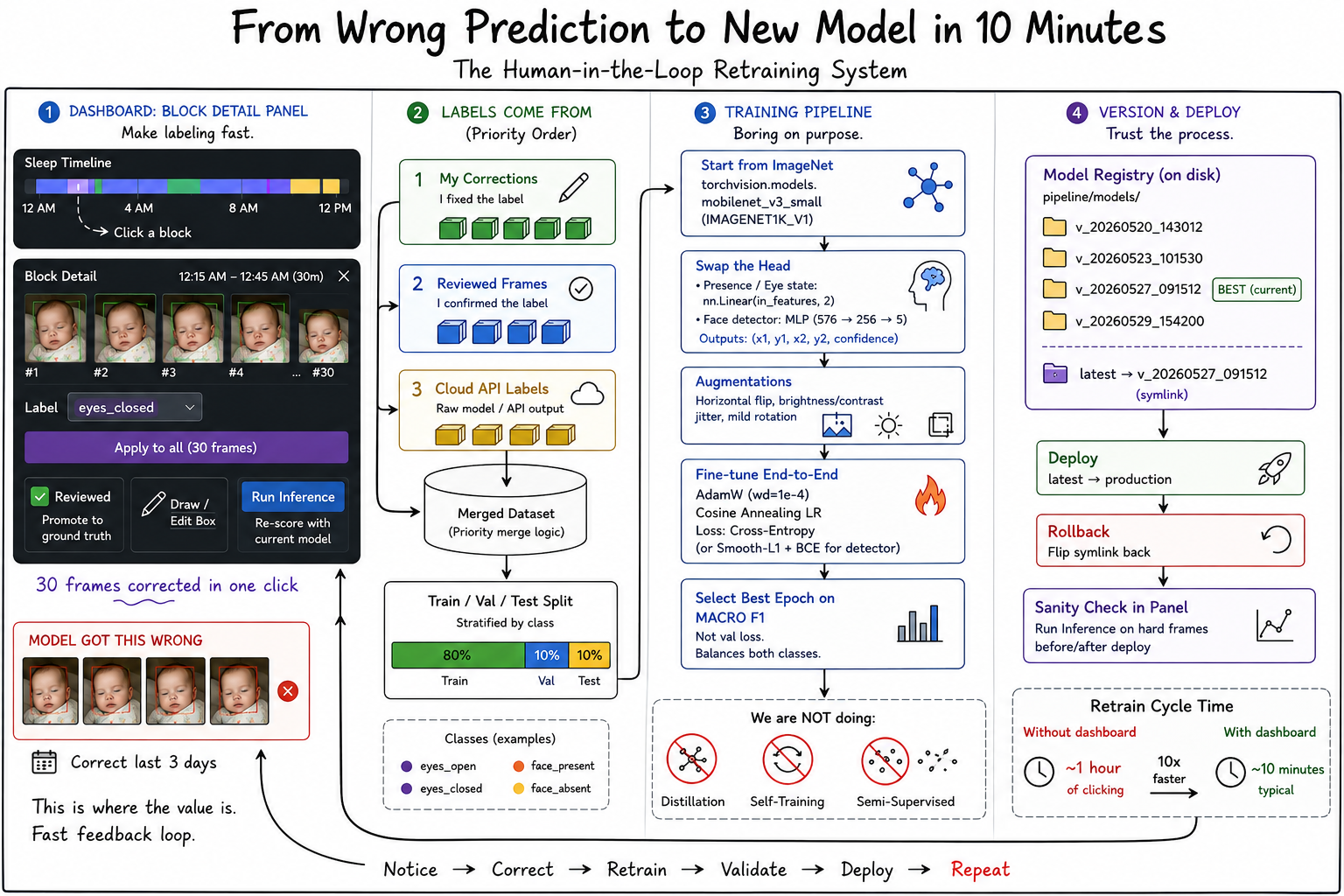
Once the labels exist, the rest is textbook transfer learning, and the diagram above walks the whole pipeline — ImageNet-pretrained MobileNetV3-Small, a swapped head, light augmentations, AdamW with a cosine-annealing LR schedule, a versioned checkpoint with a latest symlink for one-command rollback. Two choices in there are worth calling out because they're the non-obvious ones. I restart from ImageNet weights every retrain, not incrementally from the last checkpoint — restarting is cheap at this scale (a few minutes per classifier on CPU) and avoids cumulative label noise and second-order drift between deploys. And I select the best epoch on macro F1, not val loss — the class imbalance is heavy enough that val loss would happily pick a checkpoint predicting "eyes_closed" 90% of the time; macro F1 weights both classes equally.
No distillation, no self-training, no semi-supervised tricks. The entire training pipeline is ~500 lines of PyTorch and would be boring if not for all the specific places I've learned to not be clever (more on those in part 2).
Bootstrapping BIRDEYE with the cloud API
Here's a detail that matters more than it sounds: BIRDEYE wasn't the first version of the pipeline. GPT-4o was. When I started, I had no trained models and no labeled data for them. The fastest path to a working system was to let the cloud API do the hard work on every frame while the on-device models ran in "shadow mode" — producing predictions in parallel, writing both sets of results to SQLite, but with the cloud API authoritative for the user-facing state.
That shadow period did two things at once. It gave me a working baby monitor on day one (the cloud API is good enough out of the box), and it generated a labeled training set I could use to fine-tune BIRDEYE. Every frame got a (cloud label, BIRDEYE label) pair logged; every disagreement was a candidate for human review in the dashboard. After a few weeks of corrections, BIRDEYE was agreeing with the cloud API on ~97% of frames, and the remaining 3% were a mix of real BIRDEYE misses and cloud-API mistakes I could now tell apart by eye.
Flipping the pipeline — making BIRDEYE primary and relegating the cloud API to a fallback for low-confidence frames — changed the operating characteristics across the board:
| Metric | Cloud-primary (4 days pre-flip) | On-device-primary (last 7 days) |
|---|---|---|
| Cloud API calls per day | ~135 (every non-empty frame) | ~6 (BIRDEYE fallback only; 0 on 6 of the last 7 days) |
| Cloud spend per day | ~$1.35 | $0.06 |
| Median decision latency | ~1,200 ms (network RTT + model) | ~80–130 ms (full cascade, CPU only) |
| Share of non-empty frames that egress baby imagery | Every non-empty frame | 0.6% (and dropping toward 0) |
| BIRDEYE / cloud agreement on dual-run frames | — | 97.8% (2,759 / 2,822) |
| Works if home internet is down | No | Yes |
| Works if OpenAI has an outage | No | Yes (cloud fallback degrades to "low confidence") |
All numbers pulled straight from monitor.db. The cost delta is the headline — annualized, about $22/year against what used to be ~$450/year — but the reliability deltas are the bigger wins. Before the flip, an OpenAI outage would make the monitor go dark. After the flip, it keeps running and the cloud fallback degrades gracefully into a "low confidence" marker on the rare frames the cascade couldn't handle.
Here's the actual per-day call volume:
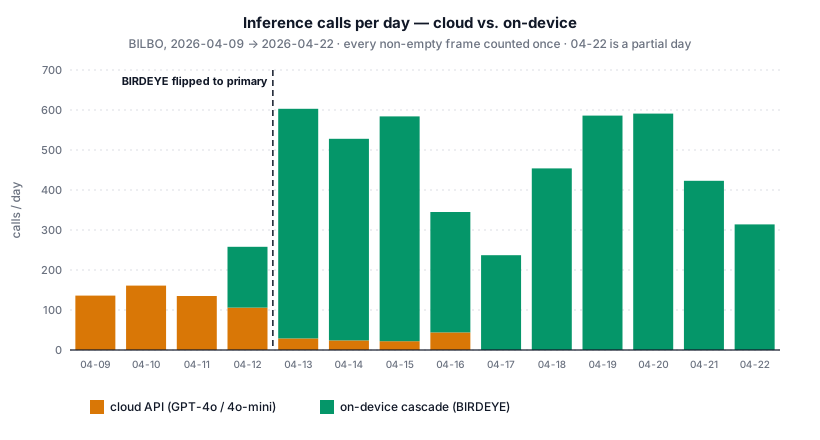
You can watch the flip happen in one frame. The orange stubs disappear entirely a few days in — BIRDEYE has been handling every decision since without needing the fallback.
The bigger point: using a cloud LLM as the development scaffolding for an in-house model is a much more pragmatic path than people assume. You don't have to choose between "hand-label a dataset for months" and "ship a cloud-only product that's permanently coupled to a vendor." The cloud API can be the first version of the product and the labeling engine for its replacement. The transition from one to the other is not a rewrite — it's a threshold crossing.
The rest of the numbers — hardware cost, the ablation table that says "bigger model didn't help," YuNet vs. the custom detector, and the current production confusion matrix — live in part 2 alongside the opinions they inform.
What's in the dashboard (and why)
The dashboard is the part of the project I underestimated at the start and ended up spending the most time on. The frontend is one HTML file, one CSS file, one JavaScript file (plus a small service worker — it installs as a PWA): no framework, no build step. The ~30 JSON endpoints that feed it now live in the control-api container; the dashboard container just reverse-proxies to them. Every panel earns its place by answering a specific question I kept asking the monitor out loud — laid out as a sticky status bar above four tabs.
Sticky status bar (always visible). Current state, how long BILBO has been in it, active alerts, and a health indicator for the capture job. The 2am glance — "is everything OK before I go back to bed?" Everything else is drill-down.
Live tab — what's happening right now
Live frame. The latest captured JPEG with a countdown to the next capture. Every other metric is derived — sometimes I want the raw pixels myself, and the countdown answers "did the capture container die?" at a glance.
Timeline strip. A horizontal day-view with every frame as a colored block (in bassinet / awake / out of bassinet). The main "what happened today" view and the entry point to the correction workflow — click a block to open it.
Daily bassinet time. Hours-in-bassinet over the last 7/14/30 days. Not a safety feature — context. Sleep volume tracks how a newborn is doing week over week, and having it here means I never open a separate sleep-tracker app.
Block detail panel. The frame-by-frame viewer behind a timeline block: face bounding boxes, per-frame and bulk relabeling, the Reviewed checkbox that promotes a block to ground truth, the bbox draw tool, Run Inference. The single most important panel in the project — it's what makes the correction-to-retrain loop cheap enough to actually run (full story in the training section above).
Models tab — is BIRDEYE still good?
System load. Load average, memory, disk, and a per-process breakdown. Cheap to have, invaluable the one time I need to know whether the Mac mini is swapping.
Pending corrections. Corrections I've made that haven't yet been folded into a training run, broken down by class. A running to-do list for the retraining loop — I check it before deciding whether a retrain is worth it.
BIRDEYE classifiers. For each classifier (presence, face detection, eye state): deployed version, training-set size, validation macro F1, confusion matrix, and — critically — production metrics for the last 6h / 12h / 24h / 7d, scored against frames I've since corrected. Training metrics show what the model learned on a frozen split; production metrics show how it does on frames the validation set never saw, and the divergence between them is the signal to retrain. The Retrain Model button lives here too (with a "skip face detector" option — that one takes ~60 min).
Eye-state daily metrics. A day-by-day P/R/F1 trend for the eye-state classifier, the one that drives the wake alert. Catches regressions too small for a 7-day aggregate but too consistent to be noise.
Shadow experiments. Hidden unless an experiment is active. Alternative pipeline variants — a larger eye-state crop, a different threshold, a new face-detector architecture — run alongside prod on every capture, so I can A/B a change before flipping it into prod.
Pipeline. Cloud API spend, average BIRDEYE inference latency, and a count of capture gaps > 10 min. I watch the cost most after a deploy — if it ticks up, BIRDEYE is dropping more frames into the cloud fallback, which means the new model is worse in a way the validation metrics missed.
Pipeline history. A table of every deploy with its training-set size, production metrics at the time, and a rollback button. Cheap insurance for the next time I ship a bad model.
Events tab — what has the baby been doing?
Daily recap. A stitched fast-forward video of a day's frames at configurable FPS. Unexpectedly useful — a 30-second recap of a nap is often the fastest way to tell if something was off (pose, swaddle, breathing pattern) without scrubbing through a timeline.
Recent events. A chronological list of state transitions with durations (Asleep 2h 14m, Awake 6m, Out of bassinet 45m, ...). The minimum-viable "what has the baby been doing" view — and the fastest way to spot a stuck-state bug where the timeline draws one giant block because the classifier has been agreeing with itself too long.
Air Quality tab — is the nursery itself OK?
The newest tab isn't about the baby directly — it's about the room. A separate AirGradient sensor logs CO₂, PM2.5, temperature, humidity, and a TVOC index into its own little database, and control-api reads it alongside the bassinet timeline.
Baby Comfort Score. A single 0–100 number that rolls those five metrics into one weighted composite (PM2.5 and CO₂ carry the most weight, then temperature, humidity, and TVOC), with thresholds tightened from the usual indoor-air guidance for a nursery context. The panel sorts the sub-scores worst-first, so when the number drops it tells me which metric pulled it down instead of making me read five gauges.
Trend charts with state overlays. The real reason this tab exists: the air-quality trends are drawn with the bassinet's state transitions overlaid as vertical lines, so I can see whether a CO₂ climb lines up with the nursery door being shut for a nap, or whether an overnight humidity dip tracks the heat kicking on. The two data streams were collected independently; putting them on one time axis is where the insight is.
What I would improve
Knowing what I know now, the next round of improvements would target the failure modes I haven't fixed yet:
Multi-modal sensing. An IP camera with a microphone (or just a separate USB mic) gives me an audio stream I could run a small wake-detection classifier on. Audio reacts faster than video for a crying baby, and the two signals are independent enough that combining them via simple ensemble would meaningfully improve recall on real wake events.
Better night-vision data. I have ~5× more daytime frames than night frames, mostly because the dashboard correction workflow is naturally biased toward "frames I happened to review during the day." A targeted active-learning loop — surface the night frames with the lowest confidence and ask me to label them — would close the gap fast.
More robust face detection in occluded poses. My trainable face detector is at 100% on the validation set but I know it fails on certain occluded poses (face turned 80° away from camera, half-buried in swaddle). The training data doesn't cover those well because they're rare. An augmentation pipeline that simulates partial occlusion would help.
A trained BassinetLocationClassifier — the proper version of an edge alert I tried and had to delete. Same MobileNetV3-Small architecture as the others, binary pressed_against_side / not_pressed, bootstrapped from the cloud API's position labels. I have an issue tracking it; one Saturday's work to actually do it. (The story of why I deleted the original attempt is in part 2.)
Conclusion
I built a baby monitor on an old Mac because I didn't trust the commercial ones and I wanted to see if I could. It cost about $40 in hardware. It runs entirely on my home network. It uses a small ML pipeline that I trained on data I labeled myself. Most frames never hit the public internet; a shrinking tail ends up at the cloud API as a low-confidence fallback, for a few cents a day. I've since cleaned it up, packaged it as a Docker stack, and put the whole thing — code and pretrained weights — on GitHub under an MIT license, in case anyone wants to build their own.
That's the build. In part 2, I get into the meta: what this project taught me about deploying ML under real constraints, the bugs that cost me a morning each, and what working with a coding agent actually felt like — including the parts where it didn't help.
The baby is asleep right now. The dashboard says so. The model is 100% confident. I checked.